My Experience With Claude Code After 2 Weeks of Adventures
Hatching...
Cursor Shenanigans
Cursor, my beloved, started rate limiting shenanigans a few days back. For a good 2 weeks after June 16, 2025, we had almost infinite API request access. I had a lot of code-related work around this time as I was working on Gumroad bounties plus my AI engineering/LLM eval-related consulting work. Apart from just codegen, I also use these tools to onboard/understand codebases faster and just ask a lot of questions in general.
cursor rate limiting shenanigans starting to kick in pic.twitter.com/abc123
— sankalp (@dejavucoder) December 20, 2024
But one fine day, they pulled the plug and started rate-limiting. I admit I milked them too much, so I didn't feel bad about this. It's worth asking whether I was doing shenanigans or it was Cursor.
cursor shenanigans or my shenanigans? pic.twitter.com/def456
— sankalp (@dejavucoder) December 31, 2024
But post this change, people have been getting rate-limited much faster, and you can only get unlimited usage using the auto-model feature. Speaking for myself, I don't really trust models other than Sonnet 4 and o3. Both are beasts at agentic search and code generation. Using these with API usage pricing can quickly lead to "oh husbant... now we are homeless."
I do trust Gemini Pro 2.5 and GPT-4.1 a bit, but I use the former 2 the most. Oh, I forgot to mention Opus 4 can really help solve some bugs on which Sonnet 4 struggles for hours so when I used to get really stuck in Cursor, I would switch on API usage pricing for a short while and solve my issue (or just dump code on the Claude chat platform)
one big reason to use cursor apart from the great developer experience was to spend 20 dollars and get 100 dollar worth of API credits value thanks to VC daddies but i am not sure if that would still retain going forward https://t.co/PYderkMs1g
— sankalp (@dejavucoder) July 5, 2025
Lately, the requests also started getting a bit slower on Cursor - Sonnet specifically. Maybe this was an Anthropic issue (someone give this company some more GPUs and senior distributed systems engineers to keep their API up).
Apart from the above, I was also influenced by many of the tpot peeps like @tokenbender, @thepushkarp, @xeophon_, @menhguin, etc. Tokenbender's blog showed that you can do a lot of power user and multi-agent stuff on the system so that got me hooked too.
How I Met Claude Code aka CC
This is, kids, How I Met Claude Code. I already had a $20 subscription. I started using Claude Code via the sub; they only provide Sonnet 4, and it was sufficient for me 90% of the time. I installed CC inside Cursor.
Cursor's diff reviewing workflow was too convenient, and I couldn't leave this behind. I like to review most of my diffs, unlike certain people who just keep pressing "Accept All"... (Anya Heh Face .jpeg)

You can review all the diffs, resolve merge conflicts, and all the nice editor things.
Sometimes you just want that pinch of o3 usage or Grok 4 or other new exciting models. Other times you just want to format some stuff because copying with correct formatting still sucks in CC. I had also gotten RLHF'ed by the Cursor notification sound at this point. Sorry, this is turning out to be a Cursor nostalgia post, but I promise the next sections are all about CC.
Anyways since Cursor had been limiting so much and I had a lot of coding work (work work and gumroad bounties haha), I decided to try out the 200 USD Claude Max subscription. It's basically unlimited Sonnet 4 and Opus 4 (and it better be) and started experimenting. I think 100 USD plan should be more than enough for most too.
Where was the model tested? Before I go into my workflow, wanted to provide some context around what programming languages and what type of codebase I was working in. Most of the time of past 2 weeks, I used Claude Code on medium sized Python codebase and a Ruby + Typescript large OpenSource codebase. 50M+ tokens. They had specs and e2e tests so yeah I did have feedback when I was done with a feature - I could run specs and Claude Code could form a loop. I would usually advise it to fix specs one by one. --fail-fast to find errors fast. Prior to Claude Code, I had been using Cursor for an year or so.
Discombubulating…
Current Workflow
Coming to the workflow, initially I just typed stuff to make changes. I stared at the screen, seeing it slowly find files and perform edits. It took me some time to trust it - 2-3 days despite the model being Sonnet 4. (I was hesitant to switch on Auto Edit mode lol)
Once I gained confidence, I started getting more into exploring commands. My effort was to get really good at the basic commands - you need to experiment/explore to even find these. It’s very easy to miss these when you just read stuff.
The next few sections are exactly what I mention above - a beginner's guide, apart from me telling my experience so far. My current Claude Code dance is to start fresh, dump my entire problem like I'm talking to a therapist, then switch to Opus if things get spicy (/model Opus → Shift+Tab for planning mode).
CLAUDE.md
These days I tell it to scribble notes in CLAUDE.md. CLAUDE.md is a markdown file which is read by Claude at the starting of a session. Naturally you want to write instructions that you want Claude to be always aware at the start and steer it a certain way. These are project-specific.
Instructions can be anything like "Do not add comments" or your project-specific workflows or how you want to run review or mentioning any custom commands that you made or details on your project's backend architecture. Read Anthropic's official guide on writing CLAUDE md for more tips like "start simple, expand deliberately".
Scratchpad
It took me 4 days to discover this trick but sometimes when I want to capture important points or retain a trail of thinking and decisions, I ask Claude to keep writing it's thoughts and update progress in a 'branch-analysis.md' file inside a .claude folder. Basically giving it a scratchpad.
You can also solve the copy-pasting nightmare to some extent by just making Claude write everything to files first, then copy from there.
Planning and Auto-editing
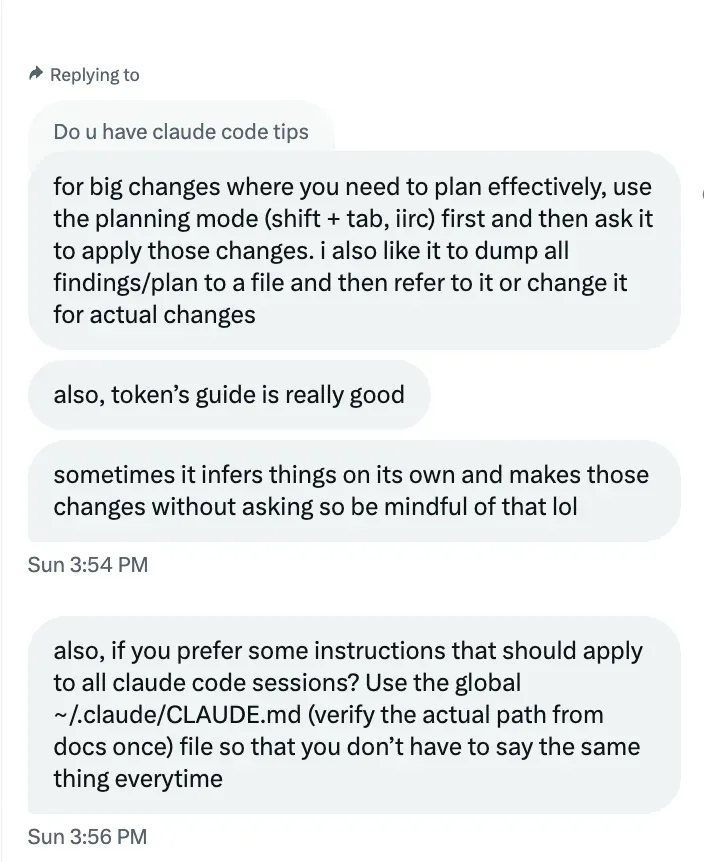
Tip: Use Shift+Tab extensively; cycle between Plan mode and the auto-edit mode. Get a plan from Opus and do 80-90% of the task with Sonnet 4. It would be faster. The below screenshot is from one of my chats with my friend Pushkar which reciprocates what we discussed here.
Flibbertigibbeting…
Basic Context Management
If you use Claude Code, it will show X% until compaction happens. The moment I see that, I just start a new chat after - telling Claude to note down the important points in a file and then I will just start a new chat. I just intuitively feel it’s better to start a new chat.
Sometimes, when I genuinely like a note and I absolutely want some of the context to stay, I do compaction. Otherwise, I don't. Plus it takes quite a few minutes to complete.
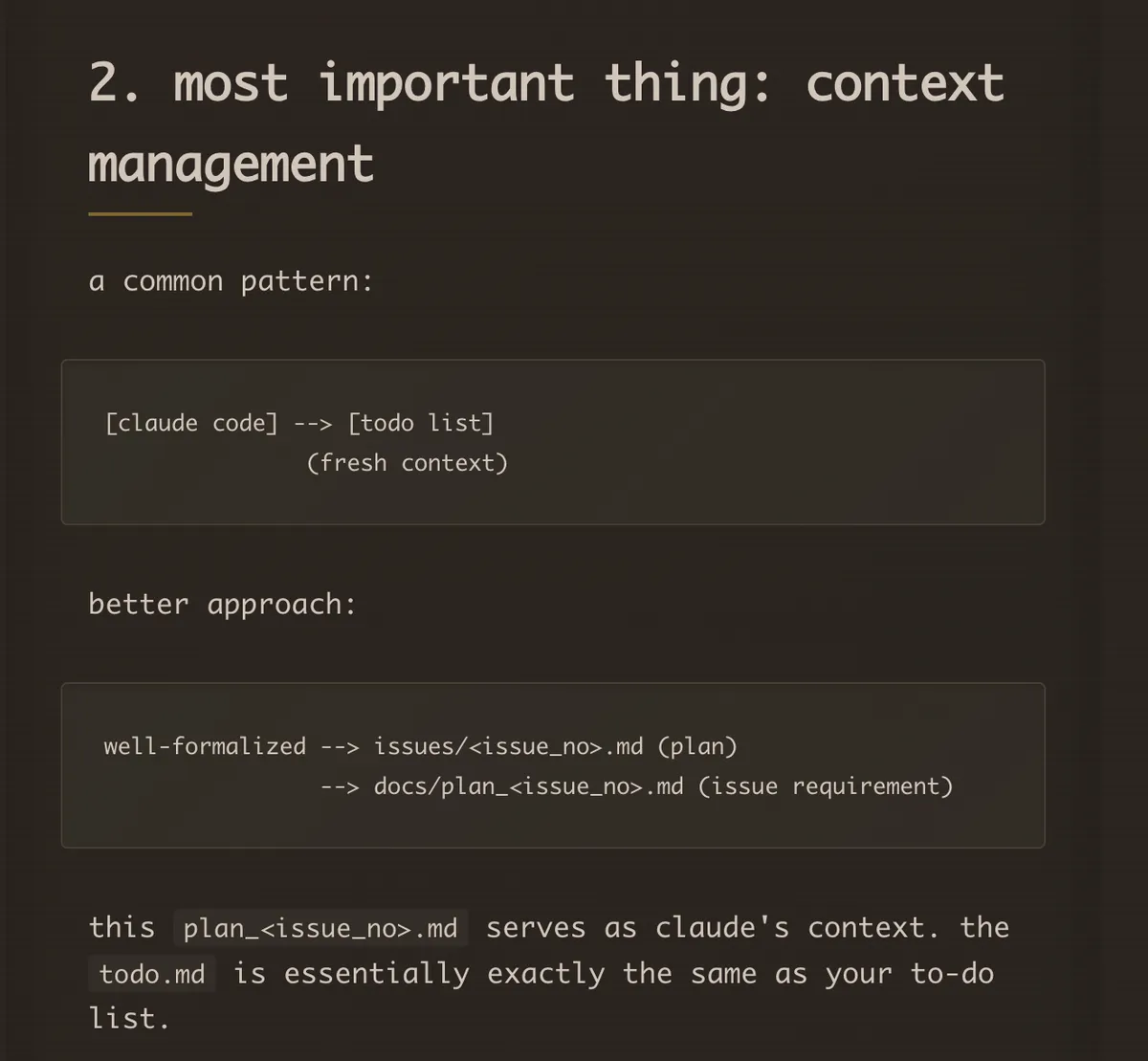
Many agent frameworks have utilised the “scratchpad” idea. You can tell claude to keep documenting it’s changes in scratchpad. It will document all files and all edits/removals/additions and maybe user notes (you can tell it to). Helps a lot when you come back to branch and start a new session. By the way, you can resume an old session by /resume Resume a conversation option. I found this after 1 week of usage 😭. Below screenshot from token’s blog.
Transmuting….
Why Sonnet Feels Better in CC Than in Cursor?
I posted this the day I started using claude code haha and the algo kinda picked it up. There are bunch of good replies btw.
why sonnet feels better in claude code than in cursor? pic.twitter.com/ghi789
— sankalp (@dejavucoder) January 6, 2025
The gist was Claude Code is likely post-trained with the same tools that it currently uses. It’s just more comfortable in the current harness. Now that I have experienced using it too, I can say the the “tool call” selection that they have implemented contributes to this.
I think it manages context better too - Cursor might be compressing or making some optimisations to the context (speculation) while Claude can just read lines in a vanilla way. I also feel CC might be using tokens more efficiently.
By the way these days, I have started using CC more in just a standalone terminal instead of Cursor because latter is buggy.
Smooshing…
Claude Task Tool
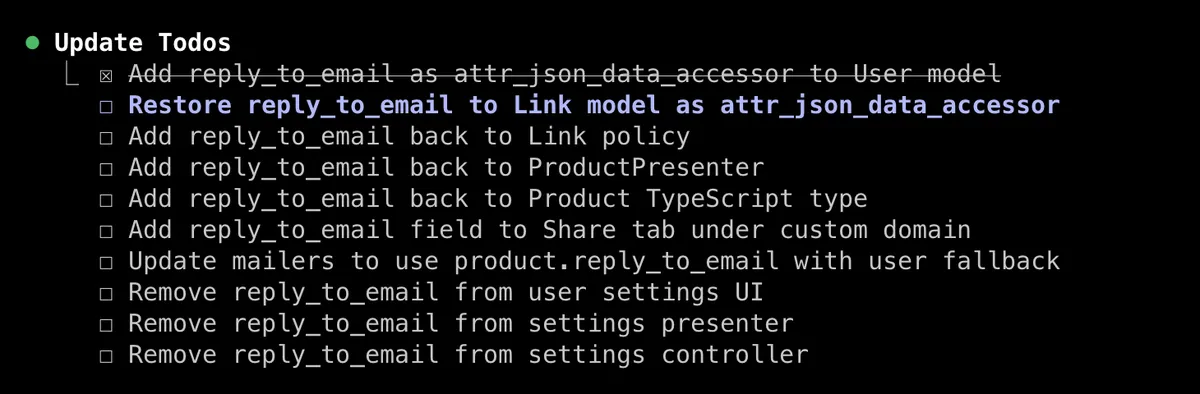
When you see this cute Todo list - it’s Claude subagents at play. These are Claude (Sonnet/Haiku) instances launched by the Main Agent (The Claude you are talking to). I don’t know the details about how the Todo List is specifically spawned or how you can manually make it spawn but it helps to do for better context management.
Edits from December 2025
Will talk about these more in the follow-up article -
- The "Task" orchestrator is really a function/tool call that decides the type of sub-agent to call and what prompt to give to it. Back in July, they used to show "Task" instead of "Explore" and then some sub-UI components showing the type of tool calls like read/edit/grep being done.
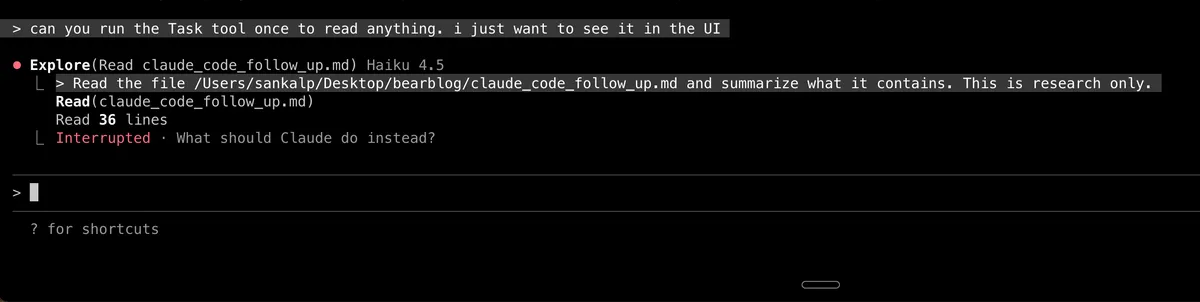
CC now literally has a feature called "Sub-agent" which launches a agent with a separate context window and it's own system prompt that is defined by the user. Sub-agents are still called via the same Task tool call I mentioned.
How TodoWriteTool works to be covered in follow-up article.
Reticulating…
Performing Search
Cursor allowed models to do normal searches and semantic search. If I am not wrong, agentic search is just letting the model explore the codebase by itself and giving it freedom to use tools like grep, ripgrep. Cursor allows for a semantic search tool call. Due to this, I think overall, Cursor search has been much faster as similarity search can bring up relevant results faster. Sometimes grep/keyword search might even miss some files because of not finding exact matches. Semantic search is used for it's fuzziness.
Coming to CC, the search seems to be pretty slow (can be mitigated by above context management techniques above). One way to speed up search is telling Claude Code to read through the codebase - something like "use 3 subagents to understand xyz" and it will launch three Task sub-agents (separate claude instances) to go search and return the outputs back to the main claude agent (the one you talk to).
You can do a lot of searches in a big codebase with this method and it runs fast because these instances/sub-agent run in a way analogous to multi-threading, orchestrated by the Task tool. They run separate from the main agent and can be Haiku 3.5/Sonnet 3.5. Since these are smaller models, they run faster.
You can specify the model and the main agent will start the new sub-agent with that model e.g "Launch 3 sonnet based agents". I personally prefer a better model for most tasks but if it's required to do grep tool calls, read and filter code, then I think even Haiku is fine.
Reference: “Task tool”.
Anthropic's recommended workflow
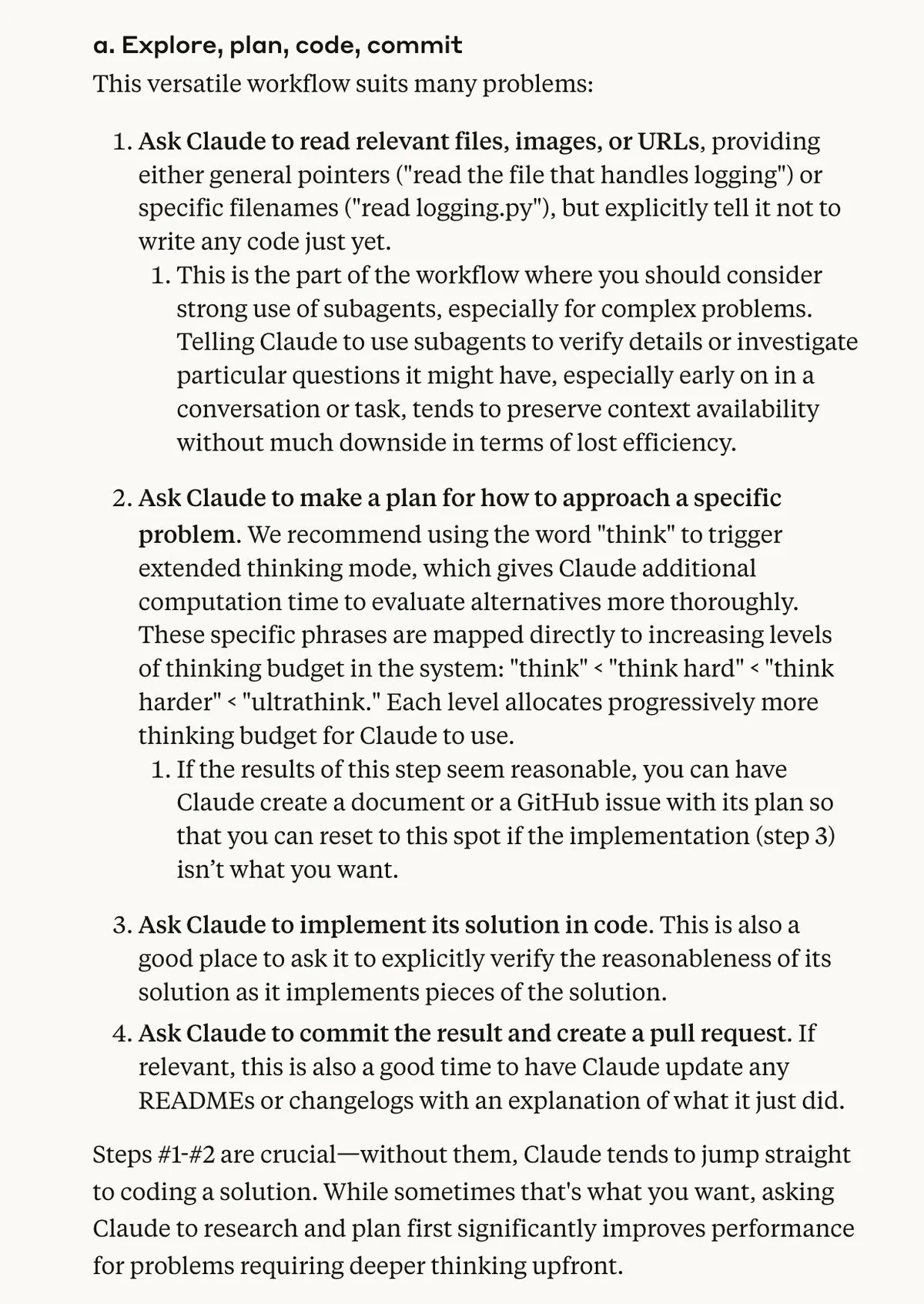
Anthropic’s official article claude-code-best-practices provides lot of valuable guidance on how you should be planning, exploring and starting to code.
The below screenshot is the meat of the Anthropic's article. My workflow is similar to this. Some key tips to note are on using Plan, when to use sub-agents and the usage of /think, /think hard and /ultrathink prompts.
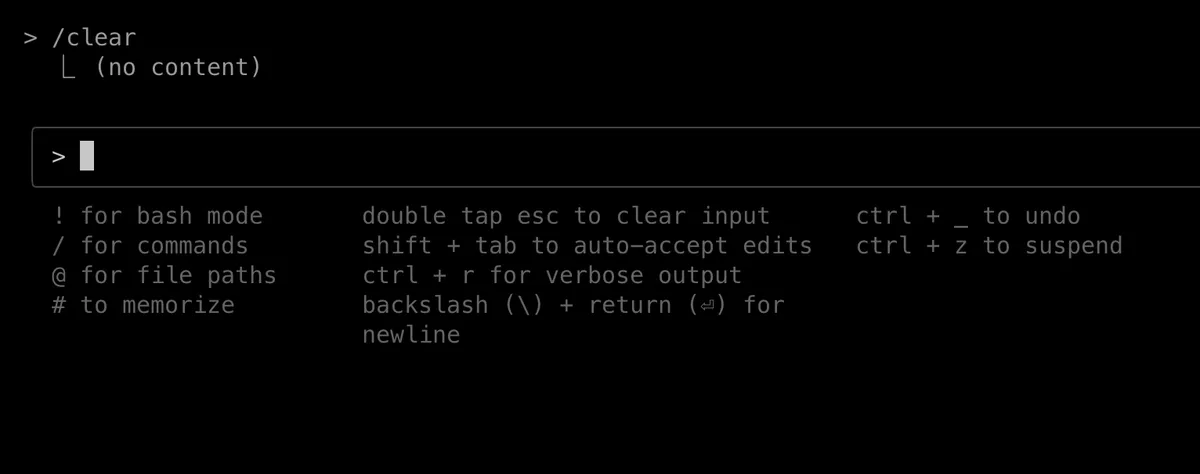
Know Your Commands and Shortcuts
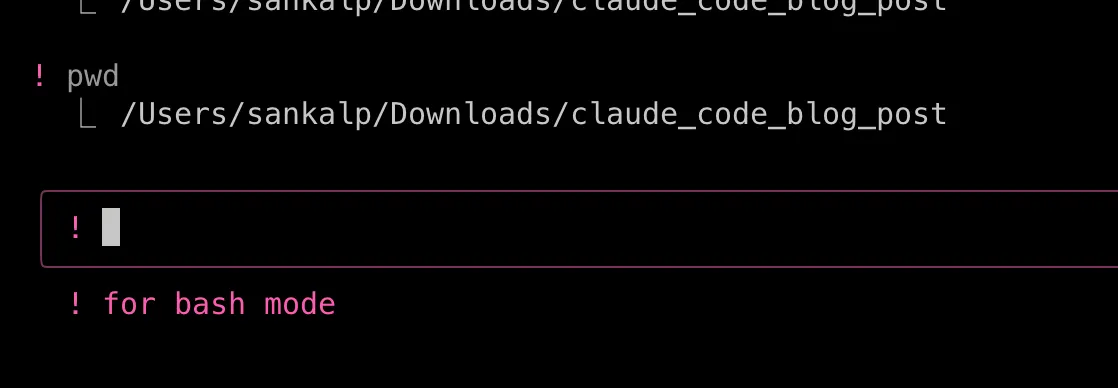
I wondered for a while how can I use bash mode without going to a new terminal window or tab. Then I had a look at shortcuts Shift + ? . You can just do !. I got to know about this after like a week of usage lmao.
It can run one off commands, but I think it cannot run a Python interactive shell like you can do in a normal terminal. Again, I love the colors.
By the way it's possible to run claude in headless mode using claude -p "search the internet and tell me about anthropic" since it's a proper CLI tool.
Moving ahead... this is gonna sound dumb, but I didn't know you can mention files using the at-the-rate character. @ to mention files. Took me 3-4 days of usage to know about this. @Josh9817 told me eventually. If I had checked shortcuts before, I would have realized this.
Memory
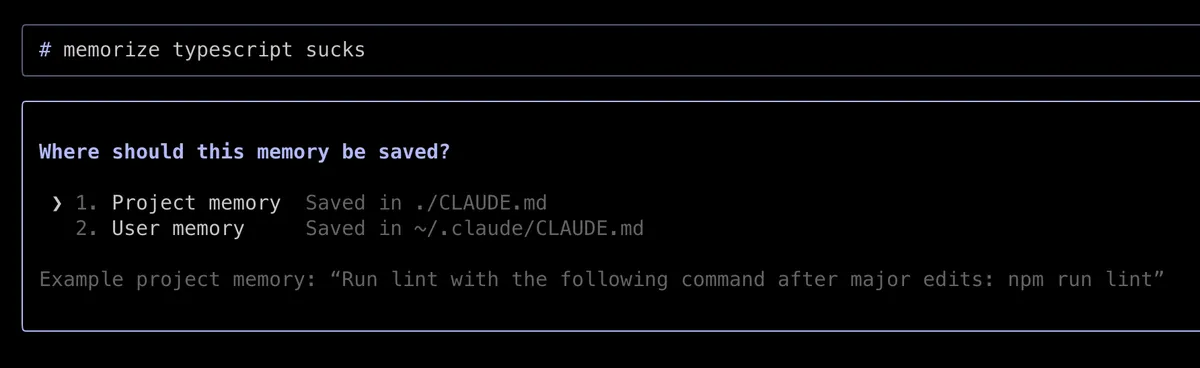
Another feature is memorize. I haven't used this a lot so far, but it's like adding custom instructions to system prompt. It will use these across sessions.
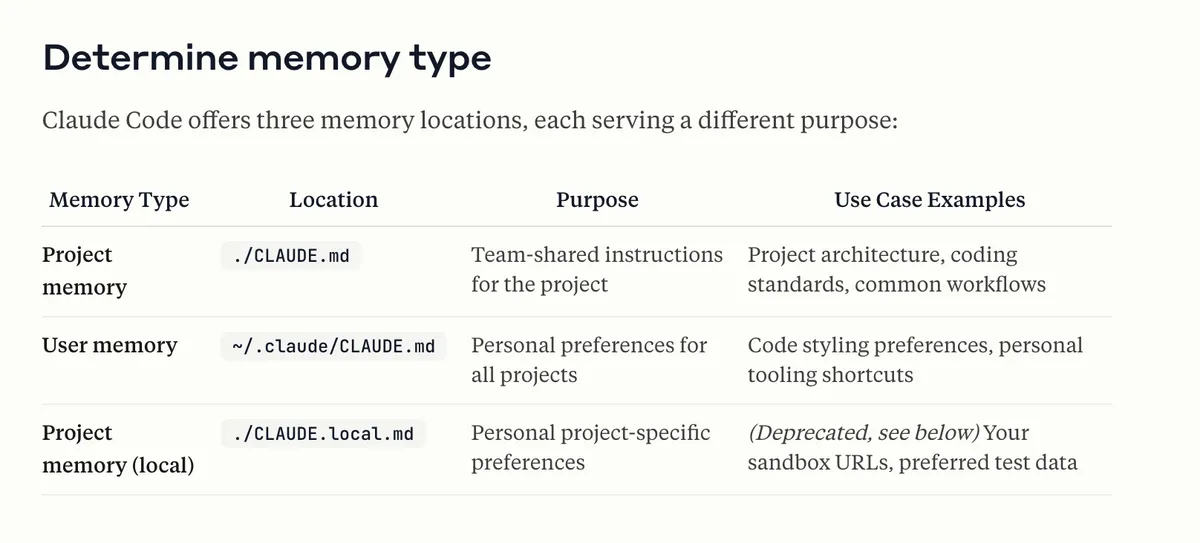
How Claude looks up memories
Claude Code reads memories recursively: starting in the cwd, Claude Code recurses up to (but not including) the root directory / and reads any CLAUDE.md or CLAUDE.local.md files it finds. This is especially convenient when working in large repositories where you run Claude Code in foo/bar/, and have memories in both foo/CLAUDE.md and foo/bar/CLAUDE.md.
Claude will also discover CLAUDE.md nested in subtrees under your current working directory. Instead of loading them at launch, they are only included when Claude reads files in those subtrees.
Love the colors!
Musing…
Sonnet vs Opus Notes
Sonnet does the job 90% of the time, infact it scores a few points above Opus 4 in SWE-bench. It's very good at Python and like any type of front-end slop. Sonnet >> Opus when things get long context plus it’s more agentic and faster.
I've noticed that Opus tends to get confused after a few turns of instructions. How I solve this → In these scenarios, I usually tell it to dump stuff in some file inside the. Claude folder and then I start a new conversation. If it is some difficult bug, I will start with Opus. Otherwise, I just start with Sonnet. If you have provided all the relevant context to Sonnet, then most of the time Sonnet does the job.
Opus does well when Sonnet gets stuck - start a new window and spam Opus.
Towards Custom Commands
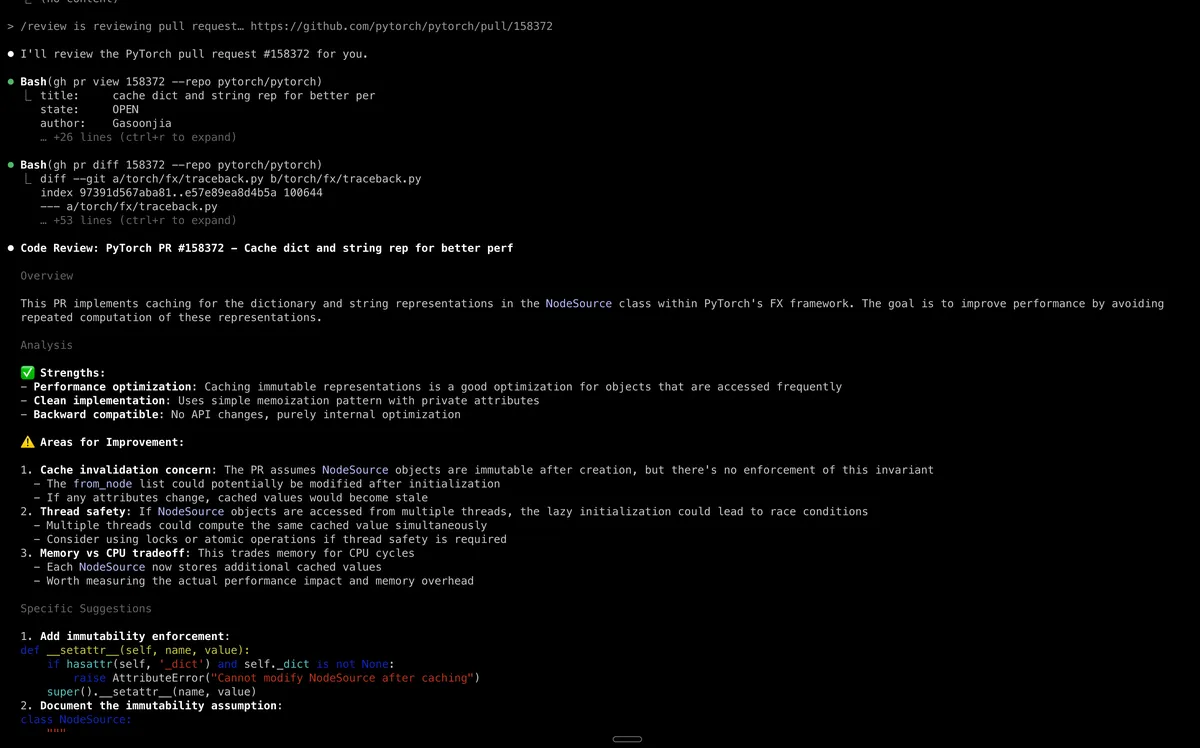
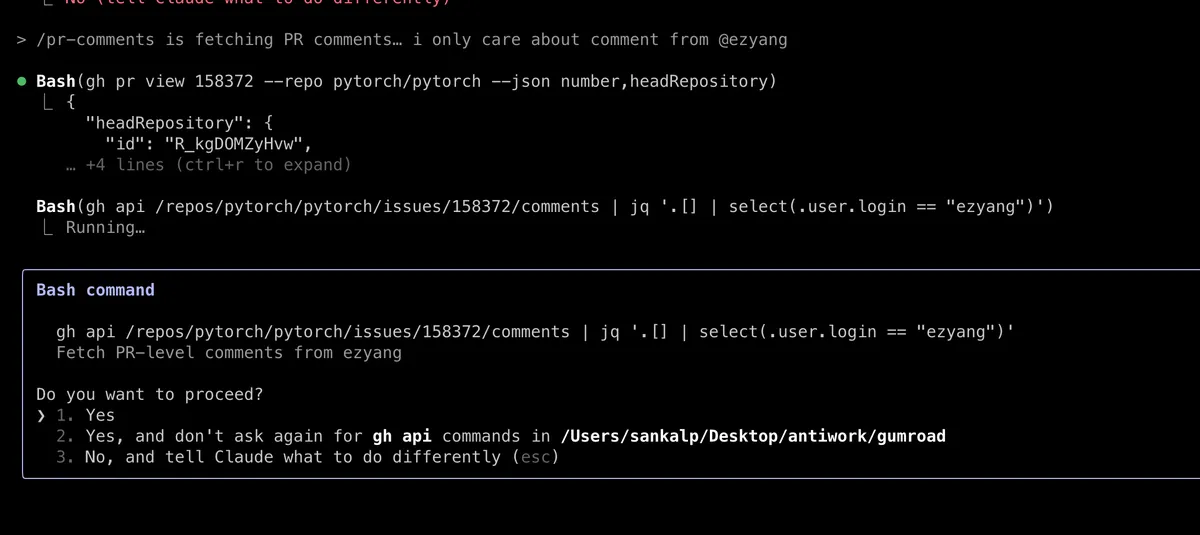
/pr-comments and /review are available by default but they reflect what a custom command can be like. You need to have github CLI installed for these.
Let’s say I made some changes on a branch, and now I want to restart the conversation. In this case, there are two options:
- You can use the review function to get it to review the diff
- There's also a command to fetch the PR comments
I can mention in some file the people whose comments are relevant, and we skip other bots and stuff. Another thing you can do is just tell it "we want to start a new session" and then we will see the diff via the review PR. This would take more steps but it would have more context. A simpler way would be to just tell it "hey please check the diff from main" (this is like a substitute for the cursor diff from main branch feature which also I loved as an experience)
Miscellaneous Command Tips
- Press Esc twice fast and you can fork from anywhere in the conversation!
- you can do / permissions to adjust permissions before a session
- Use claude --dangerously-skip-permissions if you are feeling brave
I loved this video:
Things I Would Like to Try Next
- I would like to try defining some custom commands and using them similarly
- I I would like to try some MCP servers, like Playwright server, to automate frontend development. We need to focus on creating feedback loops for Claude so it can take a screenshot, see the screenshot, and then iterate on the UI.
- All the stuff mentioned in this how-i-bring-the-best-out-of-claude-code-part-2
- I want to try some prompt optimization. This has been on my to-do list, as I have couple of tasks at work around this. I think how this will go like - first I would have to identify the criteria against which I will judge the prompt. Something stupid / easy to begin with and evolve it on the go. I can have it in one file rubric.md. Then I can have a couple of files having the context that might go into my prompt.md. prompt.md stores the prompt ofc. Then we run claude using prompt, pass the output to another claude instance for the judge, ask one claude instance to find shortcomings and then subsequently update the prompt. This can be like a single claude instance loop or a multi-agent system. (Inspired by Nirant's posts)
- Multi-agent systems where I use multiple CC instances and allow them to talk to each other using an action log
Conclusion
I consider Cursor a power use tool too and it's UI/UX is super polished. However Claude Code is one step further in terms of the power usage (but obviously behind UI/UX and a steeper learning curve)
Overall I feel due to the CLI based nature of Claude Code, it urges the user to do more exploration. I think because of lack of visual UI cues, it encourages exploration. A lot of stuff is hidden and you need to find it. It rewards you for curiosity. It might feel better for this reason for the nerds and power users.
Feature Requests
- A possible UI integration ( Can checkout Claudia but it’s a matter of time they make it too)
- Checkpointing like the one we have in Cursor. I know Git exists but still Cursor checkpointing is too convenient.
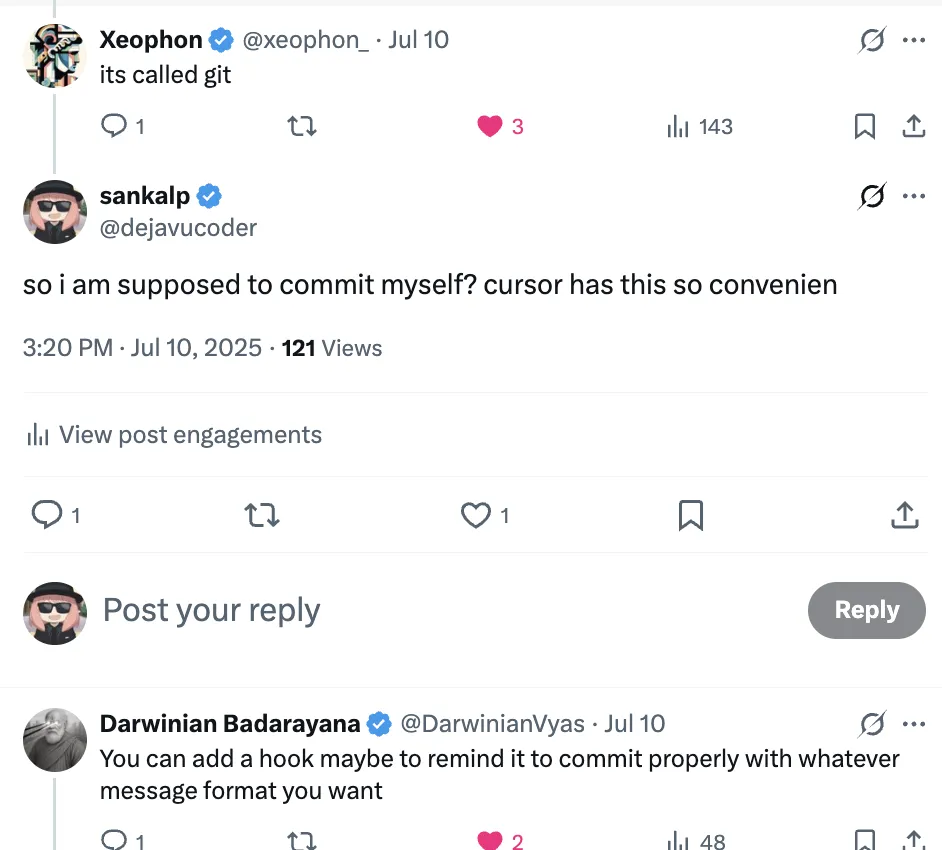
- Better copy-pasting 😭
- Allow to use other models (Ok, they won’t give this)
If you made it this far, thanks for reading! Hope you learnt something new.
great blog post about claude code experience https://t.co/jkl012
— tbpn (@tbpn) January 13, 2025
Edit: We hit HackerRank #5
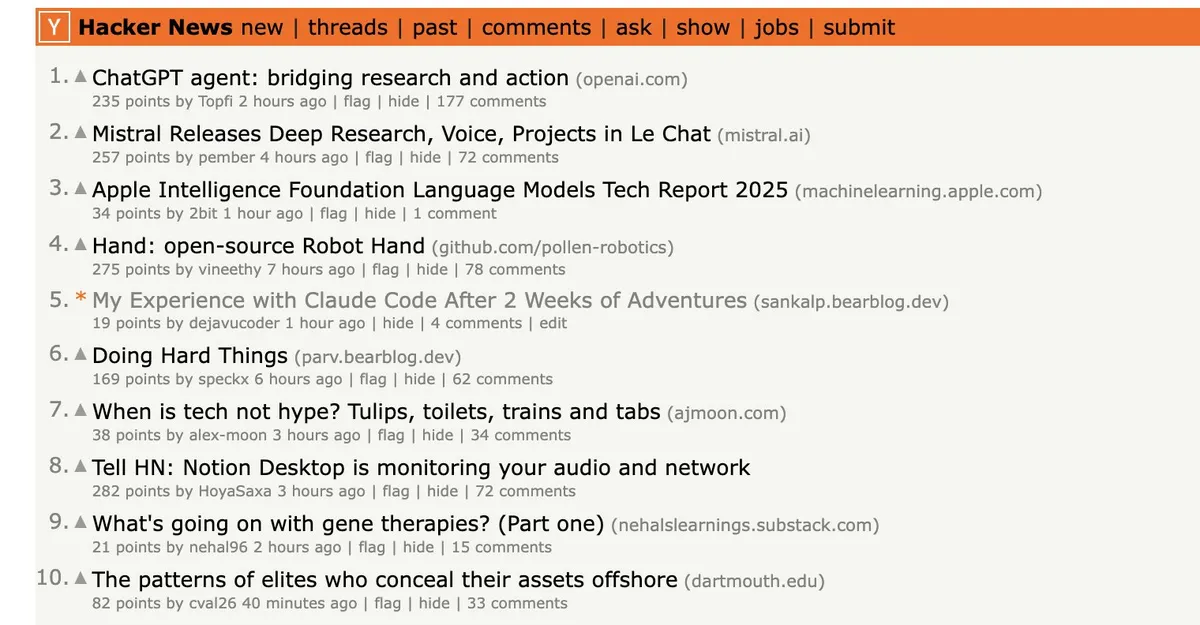
This is the 2nd time I hit Hackernews front page. You may also like my 1st Hackernews FP blogpost Shape Rotation 101: An Intro to Einsum and Jax Transformers